Close Menu
Money MechanicsMoney Mechanics
    What's Hot

    Is It Bad To Keep Too Much in Your Checking Account? Expert Cash Management Tips

    February 5, 2026

    AI Has Eliminated Entry-Level Jobs but These Graduate Careers Are Still Flourishing

    February 5, 2026

    Federal Reserve Board – Federal Reserve Board finalizes hypothetical scenarios for its annual stress test and votes to maintain the current stress test-related capital requirements until public feedback can be considered

    February 5, 2026
    Facebook X (Twitter) Instagram
    Trending
    • Is It Bad To Keep Too Much in Your Checking Account? Expert Cash Management Tips
    • AI Has Eliminated Entry-Level Jobs but These Graduate Careers Are Still Flourishing
    • Federal Reserve Board – Federal Reserve Board finalizes hypothetical scenarios for its annual stress test and votes to maintain the current stress test-related capital requirements until public feedback can be considered
    • Jim Cramer Recommends GE Vernova Over Energy Fuels
    • January jobs report will be released on Feb. 11 after shutdown delay
    • Sam Altman got exceptionally testy over Claude Super Bowl ads
    • $60 oil forces Europe’s energy giants to rethink buybacks – Oil & Gas 360
    • $50,000 for a 7-Day Cruise? Here’s What That Kind of Money Gets You on a Superyacht
    Facebook X (Twitter) Instagram
    Money MechanicsMoney Mechanics
    • Home
    • Markets
      • Stocks
      • Crypto
      • Bonds
      • Commodities
    • Economy
      • Fed & Rates
      • Housing & Jobs
      • Inflation
    • Earnings
      • Banks
      • Energy
      • Healthcare
      • IPOs
      • Tech
    • Investing
      • ETFs
      • Long-Term
      • Options
    • Finance
      • Budgeting
      • Credit & Debt
      • Real Estate
      • Retirement
      • Taxes
    • Opinion
    • Guides
    • Tools
    • Resources
    Money MechanicsMoney Mechanics
    Home»Economy & Policy»Inflation»The Savings Bond Calculator has a problem
    Inflation

    The Savings Bond Calculator has a problem

    Money MechanicsBy Money MechanicsJanuary 11, 2026No Comments7 Mins Read
    Facebook Twitter LinkedIn Telegram Pinterest Tumblr Reddit WhatsApp Email
    The Savings Bond Calculator has a problem
    Share
    Facebook Twitter LinkedIn Pinterest Email


    Here is a guide to a workaround.

    By David Enna, Tipswatch.com

    It’s a new year and I am sure a lot of investors in Series I and EE Savings Bonds are using TreasuryDirect’s Savings Bond Calculator to determine year-end values for their investments. This year, though, there is a problem.

    Using the calculator involves clicking on an .html file stored on your computer, which opens a summary of your investment values. To update those values, the user clicks on the “Return to Savings Bond Calculator” link to export the values into the calculator. No login to TreasuryDirect is necessary.

    Here is what the link looks like in the Firefox browser.

    Once you enter the calculator, you can update the values, edit the list if necessary, and re-save the file as an .html document to your computer. Success! If you have done this before you know how it works. If not, read my step-by-step guide on using the calculator.

    The problem

    Since sometime in late 2025, the .html file you save back to your computer can no longer link back to the Savings Bond Calculator. When you click on “Return to Savings Bond Calculator,” nothing happens. (For this reason, I recommend always using an updated file name when you re-save the file. For example, use the current month in the new filename. Your older file will still connect, since it is not broken.)

    I have tested the broken link issue in Firefox, Chrome, and Edge browsers and the newly saved file fails in all three.

    Obviously, something has broken in the .html file created by the calculator. A reader altered me to this issue last week and noted, “I called TD and talked to them and they say that they are aware of the problem and are working on it. They had no estimate as to the timeline.”

    This is especially frustrating at a time when investors want to create year-end updates of their holdings. However … remember that any older .html file you have saved will still connect and can be updated. The problem is that when you re-save that file, it will no longer reconnect.

    I have to wonder: “Is this a staffing-shortage problem?” Or “Is there a security issue with the current link that needs to be fixed?” We don’t know and TreasuryDirect has no warning on the calculator indicating there is a problem.

    The workaround

    I searched around for a solution and on Bogleheads (of course) I found a workable but clumsy way to fix the broken .html file.
    I tested this process and it does work. The problem for a lot of people, though, will be figuring out how to open the .html file in a text editor and then alter it. Apparently, this issue is baffling for TreasuryDirect because it hasn’t fixed the problem.

    Step by step

    I used the calculator to create a fake I Bond portfolio to test the process. Here is what it looks like:
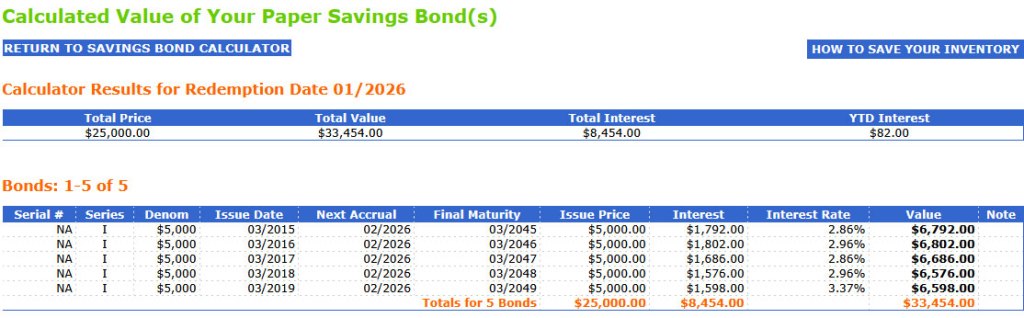
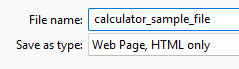
    Then, I right-clicked on that page and saved the list as an .html file to my computer. (It’s important to remember where you put the file and what you called it. Use a unique name for every update.)
    When I click on the resulting .html file on my computer, I get this:
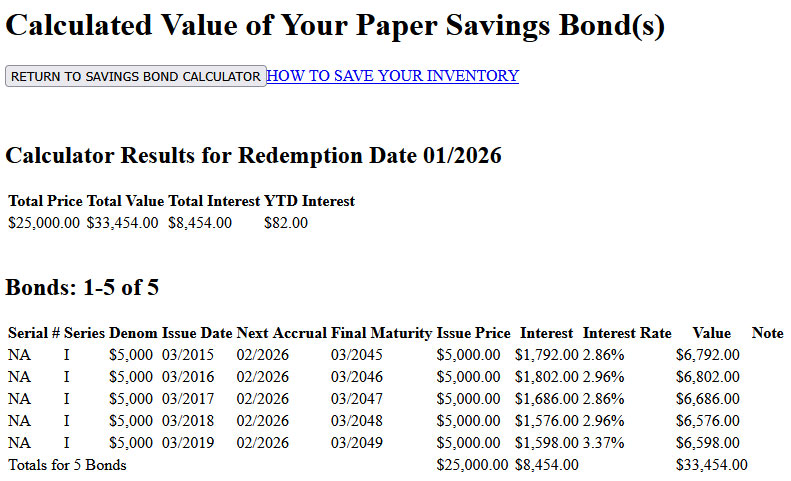
    At this point, the “Return to Savings Bond Calculator” link will not work because this is a new, broken .html file. So I have to open it in Notepad (or any text editor) to alter it. The next step is to right click on the file name and have it open in Notepad:
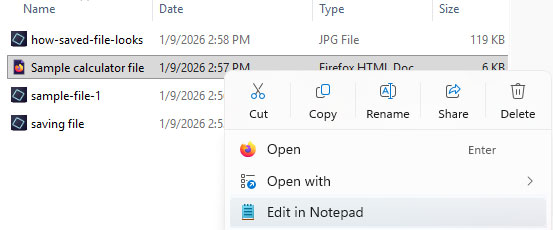
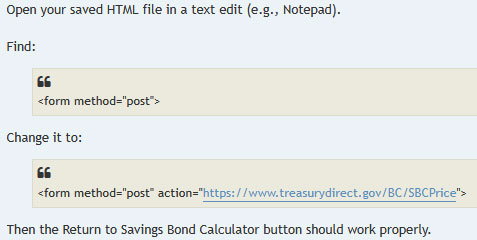
    Here is what you are looking for in the broken file:
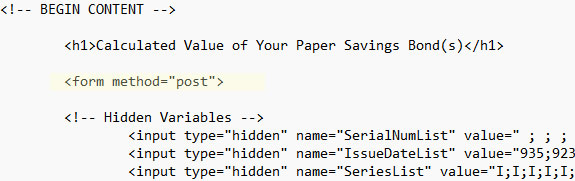
    And here is how it needs to be altered:
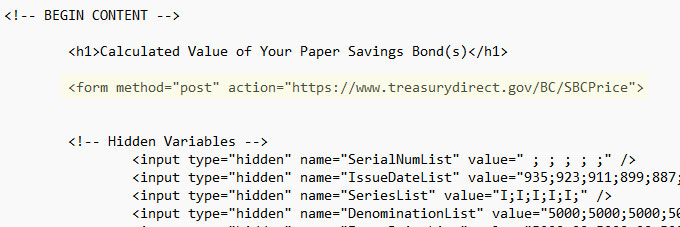
    You don’t need to type all that out, just copy and paste this:

    Important. Once the editing is complete, re-save the file as an .html document. That means you should simple “SAVE” it. Do not use “SAVE AS” because Notepad will then save it as a .txt document and not .html. It’s fine to overwrite the broken version. The newly edited file should now work. Click on it and here is the result from my example.

    When you click on “Return to Savings Bond Calculator” you successfully return to the calculator where you can update your holdings and add or remove savings bonds from your portfolio:

    Until TreasuryDirect fixes this issue, you will need to use this workaround every time you save a newly updated .html file.

    Thoughts

    The Savings Bond Calculator is a valuable tool for I Bond investors. It gives accurate results in a simple, editable format. TreasuryDirect warns that is should only be used for paper I Bonds, but it works fine for electronic versions.

    Why not just log into TreasuryDirect to view your holdings? In TreasuryDirect, you can see the total value of the holdings, but for each I Bond you can see only the current composite rate, not the fixed rate. That can get confusing since composite rates change at different months through the year, depending on the month of the original purchase.

    With the Savings Bond Calculator, you can combine a listing of two accounts (spouses, for example) and make notations on the account holder and the fixed rate for each I Bond. (I use the serial # field to do this. For example: Husband 0.2% or Wife 0.5%). So you get a complete picture of your combined holdings, and it is very easy to locate the lowest-fixed-rate I Bonds if you want to redeem those. Plus, you can also add in any converted I Bonds, which I have also done. And it is an absolute necessity for people still holding paper I Bonds.

    Because the Treasury has stopped issuing paper savings bonds of any form, I have worried that it will discontinue use of the Savings Bond Calculator. That would be a disappointing and frustrating decision.

    Fixing this problem appears to be quite simple, just altering one line of code. But we have no timeline from TreasuryDirect for a fix, or if there was a rationale for breaking it.

    Does the Savings Bond Calculator create security issues for the user? I doubt it. Remember that the calculator file is stored on your own computer, contains no personal or account information, and interacts with TreasuryDirect without any login information. I was able to use a fake investment file to test the system because it runs outside the TreasuryDirect login.

    • Confused by I Bonds? Read my Q&A on I Bonds

    • Let’s ‘try’ to clarify how an I Bond’s interest is calculated

    • Inflation and I Bonds: Track the variable rate changes

    • I Bonds: Here’s a simple way to track current value

    • I Bond Manifesto: How this investment can work as an emergency fund

    —————————

    Donate? This site is free and I plan to keep it that way. Some readers have suggested having a way to contribute. I would welcome donations. Any amount, or skip it, your choice. This is completely optional.

    PayPal link / Venmo link

    —————————

    Follow Tipswatch on X for updates on daily Treasury auctions and real yield trends (when I am not traveling).

    Feel free to post comments or questions below. If it is your first-ever comment, it will have to wait for moderation. After that, your comments will automatically appear. Please stay on topic and avoid political tirades. NOTE: Comment threads can only be three responses deep. If you see that you cannot respond, create a new comment and reference the topic.

    David Enna is a financial journalist, not a financial adviser. He is not selling or profiting from any investment discussed. I Bonds and TIPS are not “get rich” investments; they are best used for capital preservation and inflation protection. They can be purchased through the Treasury or other providers without fees, commissions or carrying charges. Please do your own research before investing.


    Source link

    Share. Facebook Twitter Pinterest LinkedIn Tumblr Telegram Email
    Previous ArticleTrump orders mortgage bond purchases. These stocks are jumping
    Next Article TransRe expands Torre’s role to global property, in addition to third-party capital
    Money Mechanics
    • Website

    Related Posts

    My Quick, Early Opinion About the Warsh Nomination

    February 2, 2026

    Selling a Business in Alaska (2026 Guide): Local Steps, Buyer Expectations, and How to Get Top Dollar

    February 2, 2026

    My schedule … and what’s coming next

    February 1, 2026
    Add A Comment
    Leave A Reply Cancel Reply

    Top Posts

    Is It Bad To Keep Too Much in Your Checking Account? Expert Cash Management Tips

    February 5, 2026

    AI Has Eliminated Entry-Level Jobs but These Graduate Careers Are Still Flourishing

    February 5, 2026

    Federal Reserve Board – Federal Reserve Board finalizes hypothetical scenarios for its annual stress test and votes to maintain the current stress test-related capital requirements until public feedback can be considered

    February 5, 2026

    Jim Cramer Recommends GE Vernova Over Energy Fuels

    February 5, 2026

    Subscribe to Updates

    Please enable JavaScript in your browser to complete this form.
    Loading

    At Money Mechanics, we believe money shouldn’t be confusing. It should be empowering. Whether you’re buried in debt, cautious about investing, or simply overwhelmed by financial jargon—we’re here to guide you every step of the way.

    Facebook X (Twitter) Instagram Pinterest YouTube
    Links
    • About Us
    • Contact Us
    • Disclaimer
    • Privacy Policy
    • Terms and Conditions
    Resources
    • Breaking News
    • Economy & Policy
    • Finance Tools
    • Fintech & Apps
    • Guides & How-To
    Get Informed

    Subscribe to Updates

    Please enable JavaScript in your browser to complete this form.
    Loading
    Copyright© 2025 TheMoneyMechanics All Rights Reserved.
    • Breaking News
    • Economy & Policy
    • Finance Tools
    • Fintech & Apps
    • Guides & How-To

    Type above and press Enter to search. Press Esc to cancel.